21 Guilloche Border Brushes: Secure Your Documents
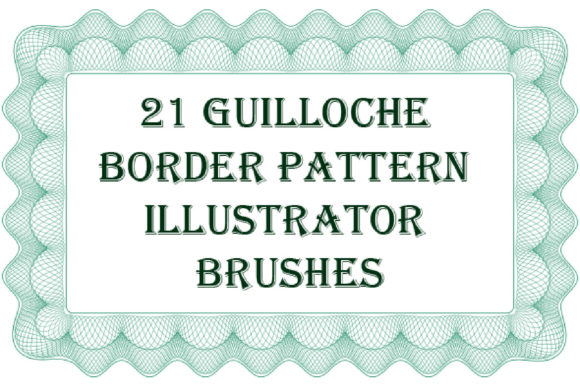
When you think about protecting sensitive documents like certificates, diplomas, or high-value vouchers, the first thing that comes to mind is usually a watermark or maybe some heavy-duty paper stock. But the real unsung hero of document security is often the intricate, maze-like line work found on borders. These are the 21 Guilloche Border Illustrator Brushes. If you have ever looked closely at a banknote or a vintage stock certificate, you have seen guilloche. It is that complex, hypnotic pattern of fine, curved lines that is incredibly difficult to replicate or scan without losing detail. This set brings that exact level of professional security and elegance directly into Adobe Illustrator.
What makes these specific brushes so valuable for creatives is the balance between high-security aesthetics and practical usability. We are talking about 21 distinct vector patterns that mimic the look of mechanical engraving. The personality of these brushes is formal, authoritative, and deeply rooted in traditional print craftsmanship. They carry a "heritage" vibe, but because they are vector-based, they fit perfectly into modern brand identity systems that require a touch of sophistication. The initial thickness is set to a hair-thin 0.113 pt, which gives you that sharp, engraved look right out of the box, but you can scale them up or down without losing the crispness of the vector paths.
Transforming Digital Art with Engraved Precision
For graphic designers and brand strategists, the challenge is often finding design assets that feel authentic. Using standard shapes for borders on a luxury certificate or an invitation can sometimes look generic. The 21 Guilloche Border Illustrator Brushes solve this by offering endless variety. You can create continuous ribbons, friezes, and edging that flow seamlessly. This is particularly useful if you are working on editorial design or packaging design where the tactile feel of the product needs to be communicated visually. A thin guilloche line wrapping around a product box suggests quality and attention to detail that a standard solid line simply cannot convey.
One of the most practical aspects of this tool is its compatibility. It works smoothly with Illustrator CC, but the package includes legacy files (AI CS and EPS 8) ensuring that even if you are working with older software or handing files off to a printer who uses an older workflow, you are covered. This flexibility is a massive time-saver. You aren't just buying a static image; you are getting a dynamic toolkit. You can change the color to match any brand identity, adjust the thickness for different scales, and even use the pathfinder tools to create unique guilloche rosettes—those circular, mandala-like centers often found on seals and crests.
Practical Applications for Security and Style
While the primary use case is document security—think diplomas, awards, and vouchers—the application of these brushes goes far beyond that. In the world of digital design, using guilloche patterns can add a layer of depth to backgrounds that flat colors cannot achieve. For web design, a subtle guilloche border can frame a "About Us" or "History" page, immediately signaling to the user that the brand has a serious, established presence. It is a subtle psychological cue that builds trust.
For marketers and entrepreneurs, consider using these brushes for social media graphics related to exclusive offers or limited-time memberships. The intricate line work stands out in a feed dominated by bold, blocky sans-serif graphics. It creates a visual hierarchy that draws the eye to the center of the frame. If you are a crafter or hobbyist, these brushes are fantastic for creating laser-cutting templates for paper art or designing custom stationery. Because they are vector brushes, they scale perfectly, meaning you can design a tiny gift tag or a massive wall poster with the same file.
Integrating Guilloche into Modern Typography
A common question with such a specific design asset is how to pair it with fonts. Because the 21 Guilloche Border Illustrator Brushes are intricate and highly decorative, they pair best with clean, legible typography. You want to avoid pairing them with a chaotic handwritten font or a busy script font for the main body text, as this will create visual noise and hurt readability. Instead, look for a strong serif font for headlines to echo the classic nature of the borders, paired with a clean sans serif font for body text.
This combination creates a balanced visual hierarchy. The guilloche acts as the "frame" or the texture, the serif headline acts as the anchor, and the sans-serif body copy provides the information without strain. This approach is standard in high-end editorial design and luxury packaging. It ensures that your document looks professional and is easy to read. Remember, the goal of a border is to contain and highlight the content, not overshadow it. By keeping the line weight thin (or adjusting it to suit your layout), you maintain that professional balance.
Getting the Most Out of Your Asset
To truly master these brushes, take advantage of the included PDF help file. It walks you through the nuances of creating seamless connections and adjusting the brush definitions. Don't be afraid to experiment with opacity and blending modes, either. A guilloche pattern set to "Multiply" at 50% opacity over a textured paper background can look incredibly realistic, simulating the look of offset printing. Whether you are a small business owner designing your own letterhead or a professional publisher creating a collector's edition, the 21 Guilloche Border Illustrator Brushes provide a robust, professional-grade solution for adding security, heritage, and elegance to your work.