Tie-Dye Patterns Brushes for Procreate: Your Shortcut to Vibrant Digital Textures
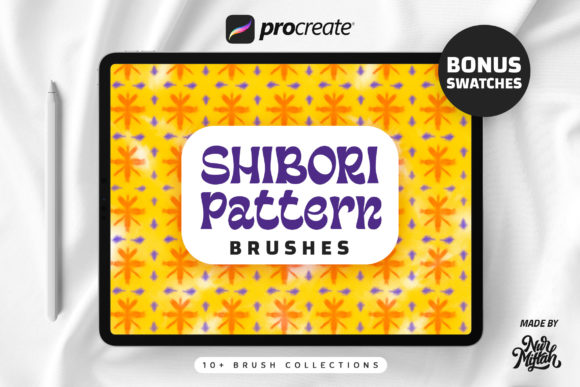
Creating authentic-looking tie-dye patterns digitally has traditionally been a complex process, involving multiple layers, intricate masking, and a lot of manual blending. For designers, crafters, and entrepreneurs looking to inject that vibrant, handmade aesthetic into their projects, the learning curve can be steep. This is where a dedicated tool like the Tie-Dye Patterns Brushes for Procreate changes the game. It’s not just a set of stamps; it’s a streamlined system designed to replicate the beautiful, organic flow of real tie-dye with just a few taps on your iPad.
What Exactly Are These Brushes and How Do They Work?
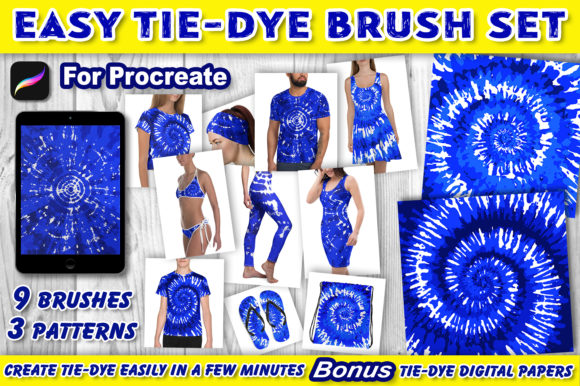
At its core, this set provides 9 specialized Procreate brushes packaged in a single, easy-to-use zip file. The magic lies in the structure: there are three distinct tie-dye patterns, and each pattern is broken down into three complementary brushes. Think of them as layers of the same design, numbered for intuitive use. You'll find brushes labeled Tie-Dye 1-1, 1-2, 1-3, and so on through pattern 3. This isn't random; it's a deliberate system to ensure you can build a perfect, cohesive pattern every time.
The process is intentionally simple, removing technical barriers so you can focus on creativity. After unzipping and loading the set into Procreate, you start with a colored background on a new canvas. You then add a new layer and stamp the first brush of your chosen pattern in white. A crucial step is creating a new layer for each subsequent brush stamp. The layer order is vital: brushes numbered 2 and 3 sit above your background, while brush number 1 remains the topmost layer. This sequence mimics how colors and folds interact in a real dyeing process, allowing the brushes to combine seamlessly into a stunning, authentic-looking tie-dye effect.
Practical Applications: Beyond Just a Pretty Pattern
The appeal of these Tie-Dye Patterns Brushes extends far beyond personal art projects. Their utility spans a wide range of professional and commercial contexts, making them a versatile asset in any creative's toolkit.
- Brand Identity & Marketing Materials: For brands targeting a youthful, energetic, or retro audience, tie-dye can be a powerful visual element. Use the brushes to create unique backgrounds for social media graphics, eye-catching flyers, or distinctive packaging design. The handmade quality adds authenticity and warmth, helping a brand stand out in a crowded digital space.
- Digital Products & Publishing: Bloggers and content creators can use these patterns to design engaging blog headers, custom digital wallpapers, or printable journaling pages. The included bonus digital papers (12x12 inch, 300 dpi JPGs) are perfect for print-on-demand services, scrapbooking, or creating cohesive digital product bundles.
- Apparel & Surface Pattern Design: This is where the brushes truly shine. Design mock-ups for t-shirts, tote bags, or phone cases with realistic tie-dye textures. The high-resolution stamps ensure your designs look sharp and professional, whether viewed on screen or printed on physical goods.
- Editorial & Web Design: While tie-dye is a bold pattern, it can be used strategically. Consider using a subtle, recolored version as a background texture for a lifestyle magazine feature or as a accent panel on a website to break up monotony and add a touch of creative flair.
The key to using a display font or pattern like this effectively is context. It might not suit a corporate law firm's annual report, but it’s perfect for a music festival poster, a children's clothing line, or a wellness brand's Instagram story. It influences brand perception by conveying creativity, fun, and a DIY spirit. When used consistently across touchpoints, it builds immediate recognition and can significantly boost audience engagement by evoking positive, nostalgic emotions.
Integrating Tie-Dye Into Your Design Workflow
Adopting any new design asset requires a bit of strategic thinking. Here’s how to evaluate and use the Tie-Dye Patterns Brushes for Procreate effectively.
First, evaluate your project fit. Does your project's mood board call for energy, nostalgia, or handcrafted charm? If yes, proceed. If you're aiming for minimalist elegance or corporate seriousness, this might not be the right tool. Next, consider your color palette. The instructions suggest using white stamps on a colored background, but don't stop there. Experiment with applying the stamps in different colors on multiple layers. You can also use clipping masks to apply the tie-dye texture only to specific shapes or text, integrating it more subtly into a font pairing or illustration.
While this set focuses on pattern, think about complementary typography. Pairing a bold, funky tie-dye background with a clean, sans serif font for your main text creates excellent visual hierarchy—the pattern energizes, while the text remains highly readable. Avoid using overly decorative script fonts or handwritten fonts directly on top of a busy pattern, as it can become illegible. Instead, use the pattern as a surrounding element or in contained areas.
Remember, the brushes are designed for personal and commercial use, giving you the freedom to incorporate them into client work and products for sale. The five-step method provided is a fantastic starting point, but don't be afraid to experiment. Try varying the opacity, using different blend modes like "Multiply" or "Overlay," or combining elements from different patterns to create something entirely new. The goal is to use these tools as a foundation for your own creativity, not as a rigid template.
Ultimately, the Tie-Dye Patterns Brushes for Procreate offer a practical, time-saving solution for adding dynamic, textured backgrounds to your digital work. They bridge the gap between the desire for a complex, organic aesthetic and the need for efficient, professional-grade tools. By understanding their structure, applications, and best practices for integration, you can leverage this set to enhance your projects, strengthen your visual branding, and connect with your audience on a more vibrant, emotional level.