Patterned Christmas Borders: Vector Brus for Holiday Design
Instant Festive Charm for Adobe Illustrator
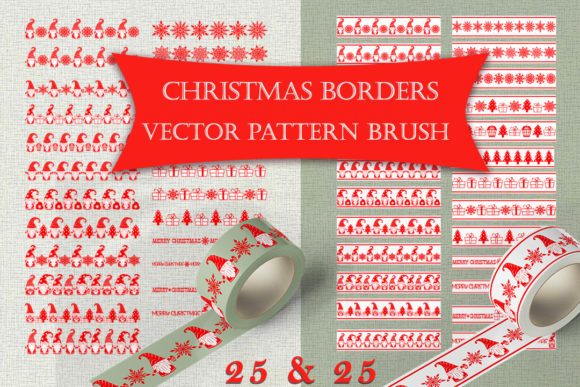
As the holiday season approaches, the pressure to create standout designs intensifies. We often spend hours sourcing individual elements—gnomes, snowflakes, holly—to piece together a cohesive look. This is where Patterned Christmas Borders changes the workflow. It is a curated collection of 50 seamless vector brushes specifically designed for Adobe Illustrator. The core appeal lies in its two distinct sets: one featuring patterns on a transparent background for layering, and another on a white background with a classic red border. This versatility allows you to switch between a clean, integrated aesthetic and a bold, traditional holiday statement in seconds.
The visual personality of this collection is unmistakably festive yet sophisticated. It moves beyond generic clip art, offering a style that balances playful holiday elements like Christmas gnomes with elegant, repeating patterns. The overall appeal is one of professional polish. Instead of a static, pre-made border that might not fit your specific canvas size or shape, these are Patterned Christmas Borders that function as dynamic design assets. You draw a path with the Pen tool or use a shape, apply the brush, and the pattern flows seamlessly along it. This is not just a decorative border; it's a flexible tool for creating custom frames, dividers, and accents that feel handcrafted for your project.
Where These Holiday Brushes Shine Brightest
The true value of any design asset is its range. The Patterned Christmas Borders collection excels across a surprising variety of applications, making it a versatile addition to any creative's toolkit. For graphic designers and marketers, it’s a shortcut to creating cohesive branding for seasonal campaigns. Imagine using the same gnome pattern brush to create a border for a holiday email newsletter, a frame for a social media post, and a decorative element on a promotional poster. This consistency strengthens brand identity during a critical sales period.
For publishers and content creators, these brushes solve the perennial problem of illustrating holiday content without resorting to overused stock imagery. Apply a brush to a text box in an editorial layout, create a unique divider for a blog post, or design an eye-catching cover for a December issue. The vector nature ensures everything stays crisp, whether printed or viewed on screen. Entrepreneurs and small business owners will find them indispensable for packaging design—think gift tags, holiday product labels, or festive wrapping paper accents. Crafters and hobbyists can use them to design personalized invitations, greeting cards, or even patterns for custom fabric prints like towels or tote bags.
Practical Integration and Creative Control
Understanding how to leverage these brushes effectively is key. The provided files—native Illustrator CC, the Ay10 file for earlier versions, and the universal EPS 10 format—ensure accessibility. The real power, however, lies in editability. After applying a Patterned Christmas Borders brush to a path, you are not locked in. You can adjust the stroke weight to scale the pattern, alter the path's curvature to change the flow, and even recolor the entire pattern with a few clicks. This level of control is what separates premium design assets from simple graphics. It allows for true customization, ensuring the final result aligns perfectly with your project's color palette and spatial needs.
When evaluating fit, consider the project's tone. The brushes with a transparent background are ideal for integrating patterns into complex compositions, layering over images, or creating subtle textural backgrounds. The white-background versions with the red border deliver a stronger, more defined look, perfect for standalone frames or where high contrast is needed. Test them by applying them to different path shapes—circles, rectangles, wavy lines—to see how the seamless pattern adapts. This experimentation helps you understand their behavior and unlocks creative possibilities beyond simple borders.
Elevating Your Design with Strategic Application
Effective design is about more than decoration; it's about communication and hierarchy. Thoughtfully using Patterned Christmas Borders can influence how an audience engages with your content. A well-placed border can guide the eye, frame important information like a sale price or event date, and inject personality into otherwise sterile layouts. In branding, a consistent use of these festive elements across touchpoints—website banners, social media graphics, print ads—builds recognition and conveys a sense of organized, professional celebration.
However, restraint is crucial. Overusing decorative elements can clutter a design and dilute the message. Use the brushes to accent, not overwhelm. Pair them with clean, modern typography—perhaps a strong sans serif font for headlines and a legible serif font for body text—to create a balanced visual hierarchy. The holiday patterns provide the festive flair, while the typography ensures readability and clarity. This approach respects both the festive spirit and the practical need for your design to function effectively, whether it's a holiday menu, a charity fundraiser poster, or a seasonal product launch page.
In conclusion, the Patterned Christmas Borders vector brush set is more than a seasonal decoration kit. It is a strategic design asset that offers efficiency, consistency, and creative flexibility. By providing customizable, seamless patterns that work directly within Adobe Illustrator, it empowers designers, marketers, and creators to produce polished, professional holiday-themed projects with remarkable speed. From digital campaigns to printed merchandise, its applications are limited only by imagination. Investing in such focused, high-quality tools ultimately saves time and elevates the final product, making your holiday designs not just festive, but formidable.