Ignite Your Designs: Using 30 Flame Illustrator Brushes
There's a specific kind of energy that fire brings to a design. It's not just about heat; it's about light, movement, and a captivating glow that draws the eye. As a designer, I'm always looking for assets that can inject that dynamic quality without requiring hours of painstaking work. That's precisely where a toolset like the 30 Flame Illustrator Brushes becomes invaluable. This isn't just a collection of static images; it's a versatile vector toolkit designed to add that perfect touch of luminous, fiery flair to your creative projects.
More Than Just Flames: A Versatile Design Asset
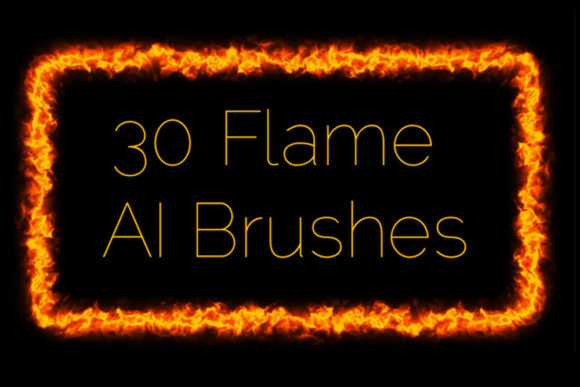
At its core, this collection provides a rich set of Adobe Illustrator brushes that emulate the look of fire, plasma, and glowing embers. But thinking of them as just "flame brushes" would be a mistake. The true appeal lies in their adaptability. The package includes 14 art vector brushes and 16 pattern vector brushes, giving you a fantastic range of options. The art brushes are perfect for creating custom shapes and strokes that follow the path you draw, while the pattern brushes excel at generating repeating elements like borders, frames, and decorative lines.
The visual character of these brushes is all about that shining, radiant quality. They are designed to mimic the way light interacts with smoke and heat, creating a soft, ethereal glow. This makes them a unique addition to any designer's library of design assets. You can easily create an endless ribbon of light, a decorative frieze for a certificate, or a glowing edging for a digital invitation. Because they are true vector files, you have complete control. You can change the color to match any brand palette, scale them to fit a billboard or a business card, and adjust their thickness to be a subtle accent or a bold statement.
Where These Brushes Truly Shine
The practical applications for the 30 Flame Illustrator Brushes are surprisingly broad. They are a fantastic tool for adding a layer of polish and professionalism to a wide array of projects. Think beyond literal fire and consider the effect of a soft, radiant glow.
- Branding and Logo Design: For brands in the entertainment, energy, or tech sectors, a subtle flame accent can communicate passion, innovation, and dynamism. It can be used to create a memorable logomark or a unique text effect for a brand name, contributing to a strong brand identity.
- Marketing and Social Media Graphics: In the fast-paced world of social media, you need to grab attention instantly. Use these brushes to create eye-catching frames around promotional images, add a "hot deal" effect to a product shot, or design a vibrant header for a YouTube channel or Facebook page. They are perfect for creating social media graphics that pop.
- Editorial and Publishing Design: A well-placed glowing element can transform a flat layout. Imagine a magazine cover for a fantasy novel, a chapter heading in a cookbook, or a decorative border on a party invitation. These brushes provide an easy way to achieve a high-end editorial design look.
- Packaging Design: For products that want to convey energy or warmth—like a hot sauce, a craft beer, or a spicy snack—these brushes can be used to create a compelling and thematic visual on the packaging.
- Personal and Hobby Projects: From designing custom t-shirts and posters to adding flair to digital scrapbooking or crafting projects, these brushes are a fun and powerful way for hobbyists to elevate their work.
A Practical Guide to Working with the Flames
Integrating a new asset into your workflow should be straightforward. The 30 Flame Illustrator Brushes are designed with usability in mind, but a few practical tips can help you get the most out of them.
Choosing the Right Brush for the Job
Your first step is to consider the project's goal. Are you trying to create a soft, ambient glow or a sharp, energetic line? The 14 art brushes are ideal for custom, organic shapes. You could draw a swooshing line to create a dynamic background element. The 16 pattern brushes are your go-to for structured, repeating elements. They are perfect for creating a consistent border around a design or a decorative line under a heading.
One crucial detail to remember: these brushes are designed to work on any background color except white. The glowing effect is built on the principle of light, so it needs a darker canvas to be visible and impactful. This is a key consideration when planning your layout.
Pairing and Readability
While these are Illustrator brushes and not a traditional typeface, they are often used in conjunction with typography. The key is balance. If you're using a bold, fiery effect, pair it with a clean, legible sans serif font or a classic serif font for body text. A highly decorative script font or handwritten font might clash with the visual complexity of the flames.
Always prioritize readability. Use the glowing effects as accents and highlights, not as a background for large blocks of text. A well-placed flame underline can make a headline stand out, but a paragraph of text over a fiery pattern will be impossible to read. Think of them as the spice, not the main ingredient.
Technical Details and Customization
This is a premium font asset that comes with everything you need for a smooth workflow. The package includes original Adobe Illustrator (.ai) and EPS (.eps) files, ensuring compatibility with Illustrator CS5 and later versions. For those on older systems, the Illustrator 10 and EPS 10 files are a welcome inclusion.
One of the most powerful features is the included PDF help file with screenshots. This is a huge time-saver, showing you exactly how to load and use the brushes. Furthermore, the documentation explains how you can deconstruct the provided brushes to create your own custom versions within your Illustrator setup, giving you ultimate creative control. The entire package is delivered in a 40.1 MB ZIP archive.
Ultimately, the 30 Flame Illustrator Brushes are more than just a novelty. They are a practical, versatile, and high-quality creative font asset that can help designers, marketers, and creators add a professional and captivating touch of energy to their work. They are a solid investment for anyone looking to make their designs a little more brilliant.