Chalk Art Brushes: Instantly Add Authentic Handmade Texture
In a digital world saturated with clean vectors and perfect gradients, there’s a powerful pull toward the organic, the imperfect, and the handmade. We see it in the resurgence of rustic branding, the popularity of farmhouse aesthetics, and the timeless appeal of a message scrawled on a blackboard. For designers, entrepreneurs, and creators, capturing that authentic, chalky feel can be a challenge. How do you get the charming, gritty texture of hand-drawn chalk art without the mess or the limitations of a physical medium? The answer lies in a versatile and powerful set of digital tools: Chalk Art Brushes.
Beyond the Blackboard: The Anatomy of a Perfect Chalk Texture
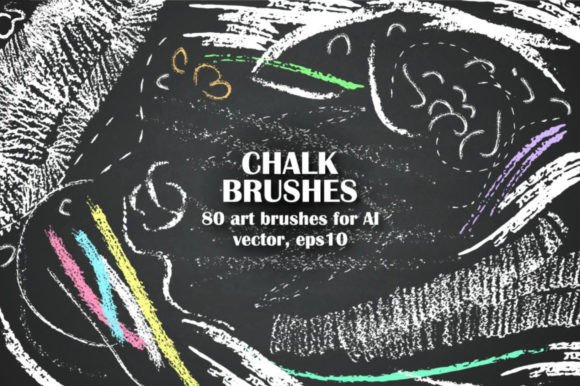
A truly effective chalk brush isn't just a solid line with a bit of noise. It needs to feel authentic. This is where a thoughtfully constructed set like the Handy set of 80 chalk brushes shines. It’s not just one texture, but a complete ecosystem of marks. You get thin and fine brushes for delicate linework and lettering, alongside rough textures for filling large areas or creating a more distressed, weathered look. This variety is critical for building depth and visual interest. A design using only one chalk texture can look flat, but layering a fine brush for a headline with a rougher texture for a background element creates a dynamic, tactile composition.
As a vector asset, these brushes offer the best of both worlds: the soul of handcraft with the flexibility of modern digital design. Unlike raster-based textures that pixelate when scaled, these vector eps10 and Adobe Illustrator files can be used on anything from a small social media icon to a massive trade show banner without losing an ounce of quality. The ability to apply to any path, adjust size and color seamlessly within Illustrator means you’re not locked into a static image. You can write, draw, decorate, and create messy textures that are fully editable and scalable, a non-negotiable feature for professional logo design and brand identity work.
Practical Applications: Where Chalk Brushes Truly Shine
The personality of chalk art is inherently friendly, approachable, and nostalgic. This makes it a surprisingly versatile tool across a wide range of projects. Its strength lies in its ability to soften a brand's tone, making it feel more human and relatable.
- Branding for Food & Beverage: Think of the menus in your favorite local café, brewery, or bakery. Chalk typography instantly communicates a sense of artisanal quality, daily specials, and handcrafted care. It’s perfect for packaging design for small-batch goods, from coffee bags to jam jars.
- Event & Stationery Design: From wedding invitations with a rustic theme to flyers for a local farmers' market or a child's birthday party, chalk brushes add a festive, personal touch that generic fonts can't replicate.
- Digital & Social Media Graphics: In the fast-scrolling world of Instagram and Pinterest, a chalk-style graphic stops the thumb. It’s excellent for creating quotes, announcements, and sale graphics that feel genuine and stand out from the polished, corporate look. Using these brushes for social media graphics can significantly boost engagement by feeling less like an ad and more like a personal note.
- Editorial & Web Design: Used sparingly, chalk elements can break up the monotony of a long blog post or add a creative flourish to a website. A chalk-drawn underline or a decorative frame can guide the reader's eye and inject personality into your web design and editorial design.
Working Smart: Integrating Brushes into Your Design Workflow
A great asset is only as good as your ability to use it efficiently. One of the key advantages of this particular set is its focus on a practical workflow. The included premade design elements—like chalk arrow sets, decorative frames, and wreaths—are a massive time-saver. Instead of drawing every single flourish from scratch, you can drop in a professionally crafted element and customize it to fit your needs.
Getting started is straightforward for anyone familiar with Adobe Illustrator. As the instructions note, you simply open the provided Ai or eps files, navigate to Menu > Windows > Brushes, and the entire library of 80 brushes is ready to go. The artboard in these files serves as a visual catalog, so you can see exactly what each brush looks like in action before you apply it.
- Apply with Precision: Use any drawing tool—the Pen Tool for smooth curves, the Pencil Tool for more organic shapes—to create a path. With the path selected, simply click on your desired chalk brush from the panel.
- Customize for Your Project: Adjust the stroke weight to change the brush's scale. Change the stroke color to move beyond classic white-on-black. This flexibility is where the magic happens, allowing you to match the chalk texture to any color palette.
- Build a Permanent Library: To avoid repeating this process for every new project, save the brushes to your permanent library. The process is simple: save the .eps file as a native .ai file, then use the Brush Library menu to save the set. This makes the brushes available in any Illustrator document you open, integrating them seamlessly into your professional toolkit.
When evaluating any design asset, especially a premium font or a creative font alternative like a brush set, consider the complete package. The inclusion of multiple file formats (vector eps10, Ai, jpg preview) and bonus elements demonstrates a commitment to user value. For designers, marketers, and small business owners, tools like these aren't just decorative; they are strategic assets that help communicate a specific brand personality, enhance audience engagement, and build a recognizable visual language. By choosing a high-quality set of Chalk Art Brushes, you're not just buying a texture—you're investing in the ability to bring warmth, character, and a touch of handcrafted charm to any project you undertake.